Plan an eight-second short-drama scene in Seedance 2.0
Use character references, four storyboard drawings, and a timed shot list to direct an animated chess-room confrontation.
Build this eight-second scene around four beats: a woman makes a chess move, her opponent reacts, the camera reveals the board, and she delivers a final line at a moonlit window.
Prepare character artwork, four storyboard drawings, a room reference, and a timed prompt. Send them to seedance-2-0-pro through VizoAPI’s POST /v1/generations endpoint. The Seedance API page compares the Seedance models and their per-second rates.
1. Write the scene as four visible events
Before preparing the API request, separate the story from the camera directions. The story is short: the woman wins an exchange, the opponent resents it, and the final line keeps the conflict open.
Allocate the eight seconds before writing camera directions. Use this timing sheet to keep each action within its interval.
| Time | Story event | Camera instruction | Reference |
|---|---|---|---|
| 0-3 seconds | Woman sits and makes a chess move | Reframe toward the action | Storyboard 1 |
| 3-4 seconds | Opponent reacts with anger | Fast pan into a face close-up | Storyboard 2 |
| 4-6 seconds | Another move draws a reaction | Cut to an overhead view | Storyboard 3 |
| 6-8 seconds | Woman speaks beside a window | Tilt down into black, then reveal the room | Storyboard 4 |
Read the dialogue aloud against that timing. The first line needs room within the opening action. The ending has to accommodate both a transition and another line. This is already a dense brief; adding another entrance or a second conversation would require a new timing plan.
Keep the four rows next to your generation settings. They become a review sheet after the video finishes.
2. Prepare character references separately
Prepare a portrait of the woman and a separate portrait of her opponent. Use them to define hair, face, clothing, and visual style. The clips and frames here are from ByteDance’s own example.

Use one consistent name for each role in your project. “Woman” and “opponent” are sufficient here. If your script uses names, describe which attached portrait supplies each character’s appearance in the prompt.
Prepare a location reference for the furnished chess room and its large window. Use that image for the room’s look and the storyboard for camera positions within it.
Keep those jobs distinct. A character portrait does not tell the model where the table is. A room image does not tell it which person speaks. Your prompt has to connect the assets to those responsibilities.
3. Use simple drawings for composition
The first storyboard is a silhouette reaching toward the board. It describes a pose and a view without trying to finish the character design.
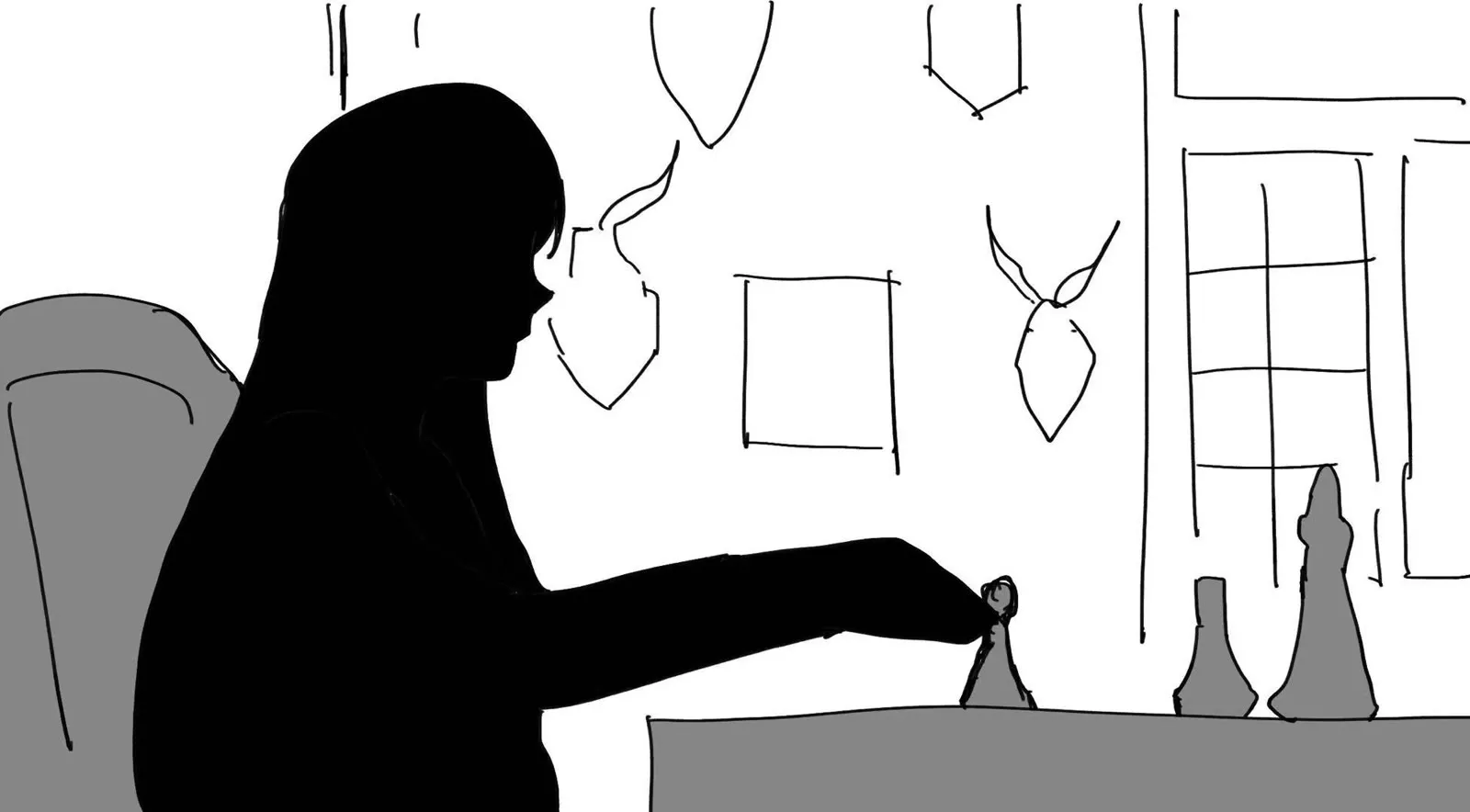
Prepare each drawing around a specific decision. For the opening, check whether the reaching hand and board occupy enough of the frame to explain the move. The viewer should understand the action without needing to read a caption.
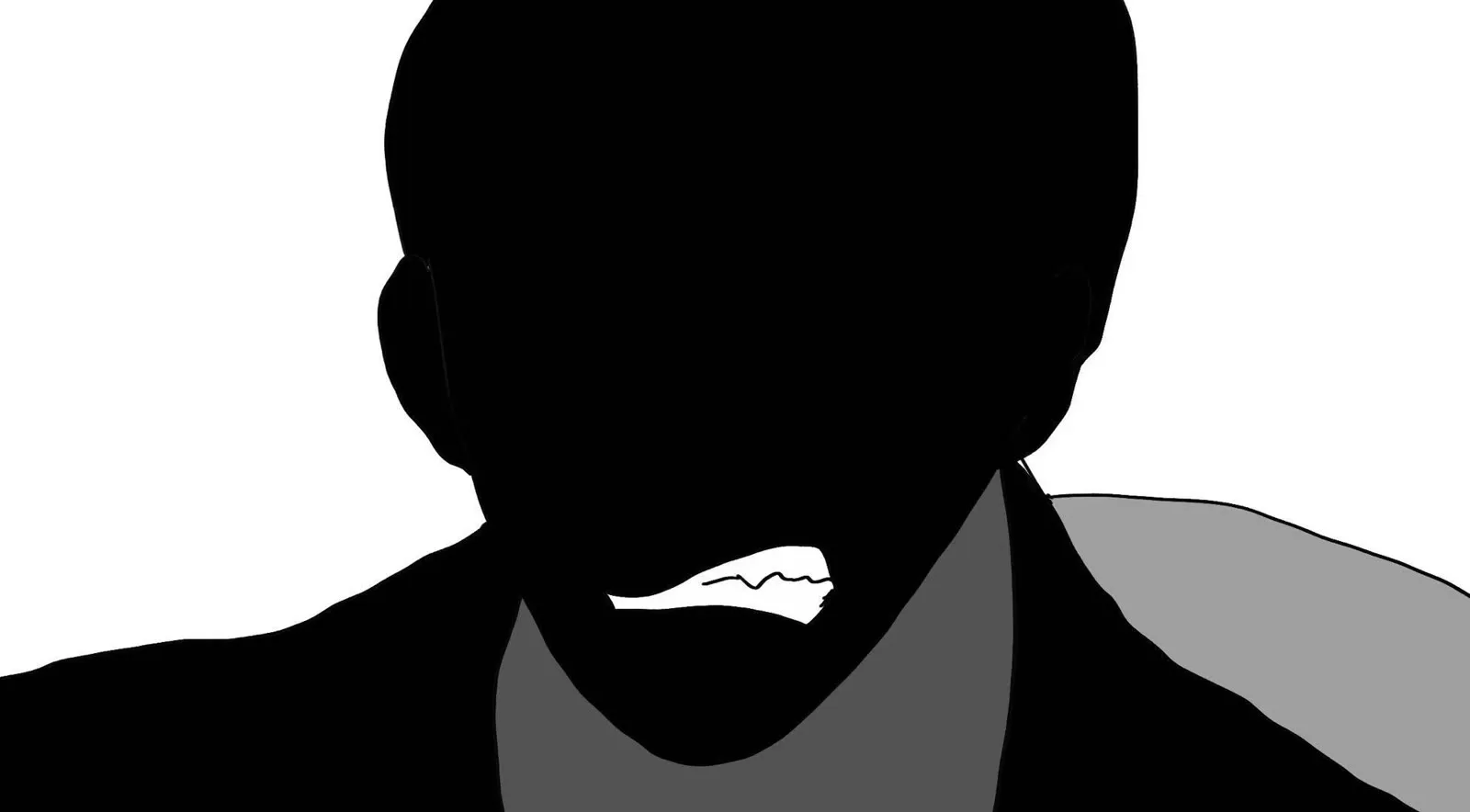
For the opponent’s reaction, draw a close view of his face with clenched teeth. Make the expression readable within the one-second shot.
The third drawing changes the viewing angle. It shows the board from above, with spectators across the table.
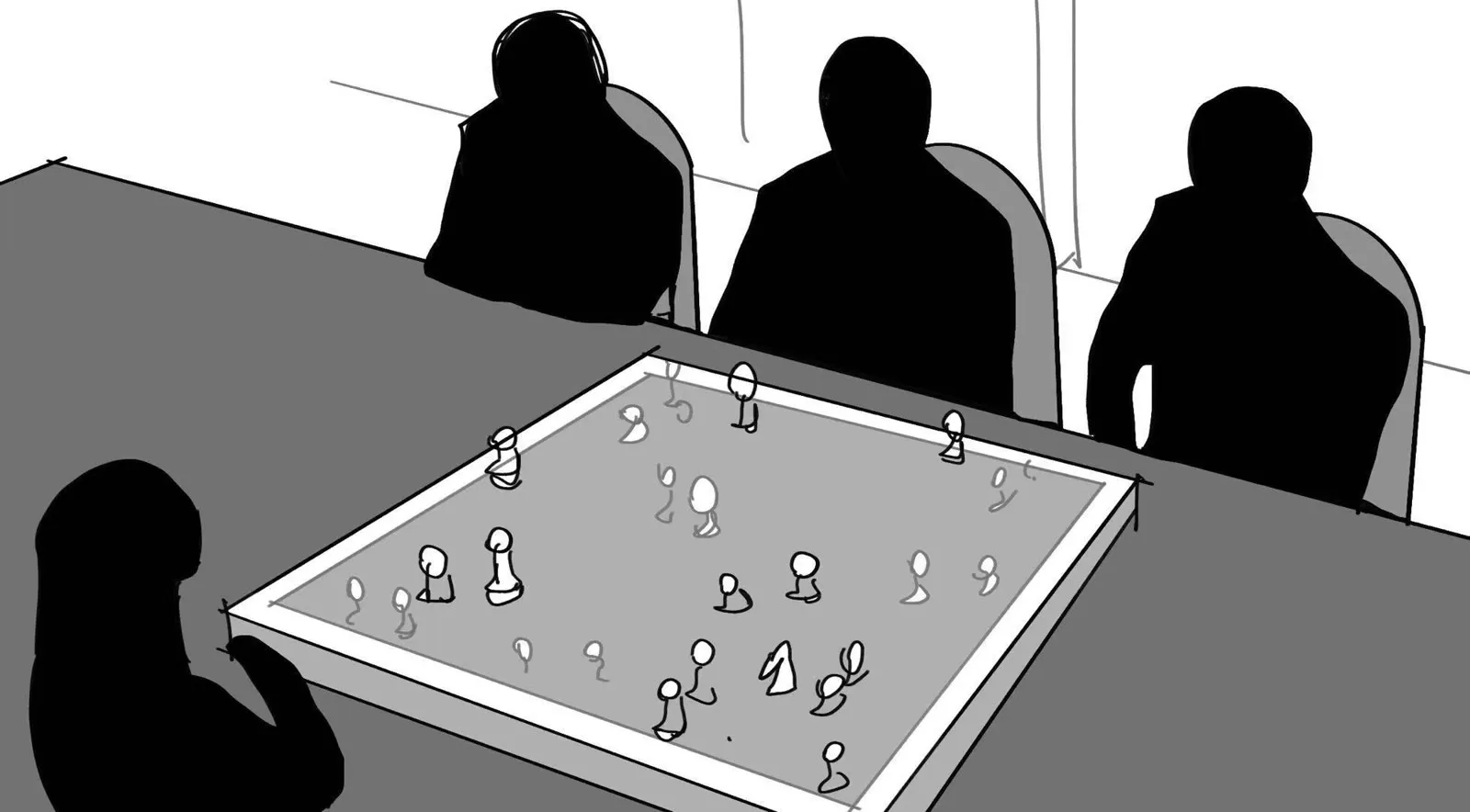
Before generating, compare the drawings in order. Check which side of the table each main character occupies. Check whether the window and spectators belong in the same room. Resolve any inconsistency in the assets before asking the video model to connect them.
4. Bind the complete reference set
For VizoAPI, put the two portraits, four storyboard drawings, and room image in input.content. Each picture is an item with type: "image_url", a nested image_url.url, and role: "reference_image". Seedance 2.0 Pro accepts up to nine images; this scene uses seven.
Keep the same image order in every revision: woman, opponent, storyboard drawings 1 through 4, then room. Describe those responsibilities in the text prompt. VizoAPI accepts the prompt as a type: "text" item; its input spec defines no special reference-tag syntax. The descriptive names in the brief are instructions for interpreting the pictures.
| Field | Scene setup |
|---|---|
model |
seedance-2-0-pro |
input.duration |
8 seconds |
input.ratio |
"16:9" |
input.resolution |
"720p" |
input.generate_audio |
true, for the requested dialogue |
| Image roles | Seven reference_image items |
Send this body to POST /v1/generations. Replace the example image URLs with accessible HTTPS URLs for your own assets, and replace the short text value with the full brief in step 5. The first portrait URL is a placeholder.
{
  "model": "seedance-2-0-pro",
  "input": {
    "content": [
      {"type": "text", "text": "Create an eight-second chess confrontation. The woman and opponent portraits define the cast; the four storyboard drawings define the shots; the room image defines the setting."},
      {"type": "image_url", "image_url": {"url": "https://example.com/woman.jpg"}, "role": "reference_image"},
      {"type": "image_url", "image_url": {"url": "https://example.com/opponent.jpg"}, "role": "reference_image"},
      {"type": "image_url", "image_url": {"url": "https://example.com/storyboard-1.jpg"}, "role": "reference_image"},
      {"type": "image_url", "image_url": {"url": "https://example.com/storyboard-2.jpg"}, "role": "reference_image"},
      {"type": "image_url", "image_url": {"url": "https://example.com/storyboard-3.jpg"}, "role": "reference_image"},
      {"type": "image_url", "image_url": {"url": "https://example.com/storyboard-4.jpg"}, "role": "reference_image"},
      {"type": "image_url", "image_url": {"url": "https://example.com/room.jpg"}, "role": "reference_image"}
    ],
    "duration": 8,
    "ratio": "16:9",
    "resolution": "720p",
    "generate_audio": true
  }
}
Keep model outside input. The model supports integer durations from 4 to 15 seconds and resolutions of 480p, 720p, or 1080p. Use eight seconds and 720p to match the clip’s approximate length and 1280 × 720 frame.
Use reference-image roles throughout this request. A first_frame image cannot share a request with reference images or reference audio, and a last_frame requires a first frame. If you need those endpoint constraints, prepare a separate frame-based request.
5. Write the timed brief
Put this four-shot plan in the text content item, alongside the seven images. Keep the reference descriptions consistent with the files you attach.
Create an eight-second animated confrontation built around a chess game.
Use the woman's portrait and the opponent's portrait for their appearance.
Use the room image for the setting and the four storyboard drawings,
in their supplied order, for the shots.

0-3 seconds: The woman turns, sits, and moves a chess piece. Reframe toward
her action using storyboard 1. She tells her opponent, in English,
"You lost."

3-4 seconds: Pan quickly to a close view of the opponent, following
storyboard 2. His clenched teeth show his anger at the result.

4-6 seconds: Cut above the table using storyboard 3. The woman makes
another move as the people opposite her react in surprise.

6-8 seconds: Tilt rapidly downward into a black transition. Reveal a dim
room using storyboard 4. The woman looks toward the moonlit window and
quietly says, in English, "We'll see about that."
Use one verb for each camera operation. A pan changes the camera’s viewing direction. An overhead shot specifies a viewpoint. A cut changes shots. Keeping these separate makes the brief easier to inspect and revise.
6. Compare the delivered cuts with the plan
Play the result at normal speed, then inspect the transitions. The timeline is text guidance; there is no per-shot timing field. Review where the cuts actually land.
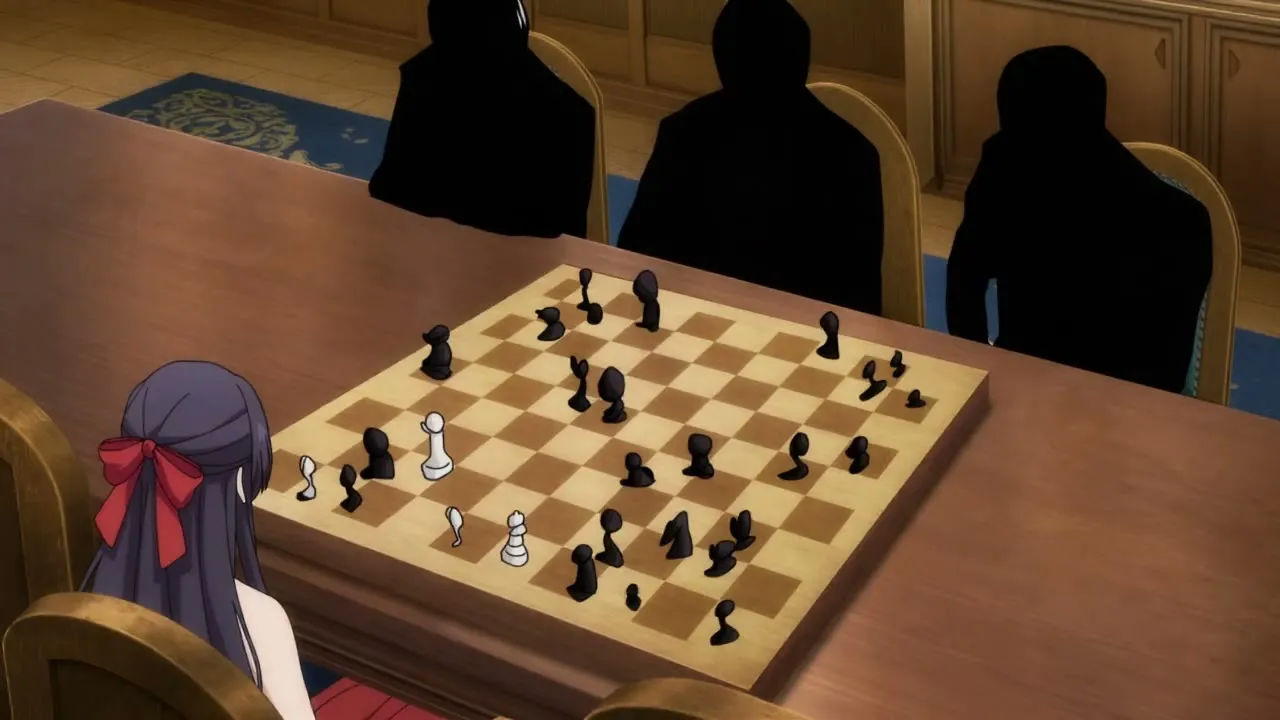
That frame gives you two concrete checks. First, the overhead view arrives earlier than the timing requested in the written shot list. Second, the three spectators remain solid silhouettes, much like the drawing.
If your production needs fully rendered supporting characters, catch that at review. Replace ambiguous silhouette assets with clearer character or crowd references, and clarify the role of each reference before another generation. Do not approve a scene solely because its main character looks right.
For a timing problem, revise the action budget and submit a new VizoAPI request, or trim the delivered clip in your video editor. Avoid piling more actions into the shortest interval. A one-second reaction is already a brief window for a pan, a face, and an expression.
7. Check the final shot against the character reference
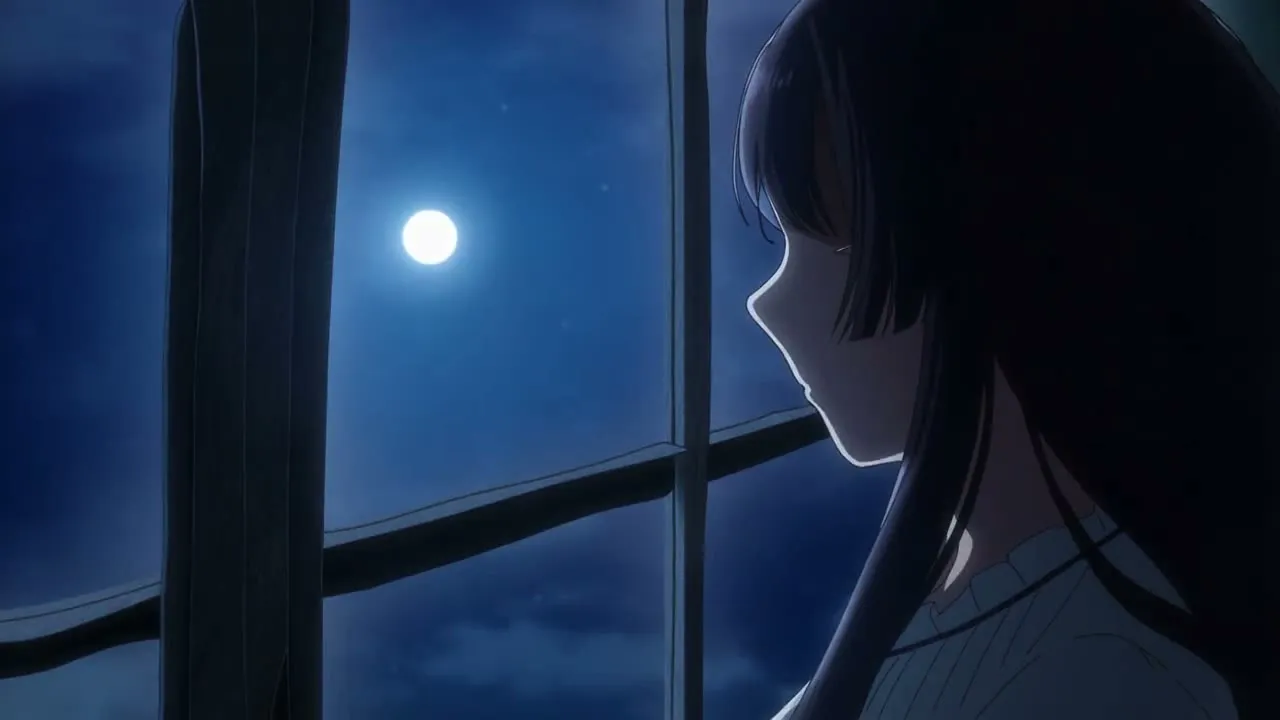
Compare the face, hair, and costume in the opening and ending. The ending shows a pale top where the opening uses a red dress. If your scene takes place in one continuous moment, flag that costume change before approving the sequence. Then listen for the final line. The ending has its own job: it must leave the viewer with the character’s response after the board scene.
Review the chess action at the level your story requires. A dramatic board shot and a legally correct sequence of chess moves are different acceptance criteria. If the plot depends on a particular move, have a chess player check the board before approving it.
Save the accepted shot list alongside the output. Mark any timing changes made in the edit. For the next scene, reuse the character references and room assets. Write a new action plan and compare it with the accepted ending before generating.