Re-render a white-model motion clip with Seedance 2.5
Turn a six-second white-model walk into a finished rooftop shot, with a reference-video request and checks for motion, framing, and sound.
Start with a white-model animation of a figure taking cautious steps against a plain wall. Use Seedance 2.5 to render that movement as a small raccoon in dark clothing crossing a rooftop above a blue and purple city.
Use your own animation or a reference you have permission to use. Keep the gesture and timing you need, then describe the new character and environment. Review the motion after rendering; a reference clip does not give you exact frame-by-frame control.
Send the clip and a scene brief through VizoAPI’s POST /v1/generations endpoint. The Seedance API page lists the rate of a request with an input video at each resolution.
1. Choose a clip with a complete action
Choose a short sequence whose movement already reads clearly. For this six-second shot, use a single white figure walking carefully from left to right, with bent knees and arms held away from the body.
The clips and frames here are from ByteDance’s own example.
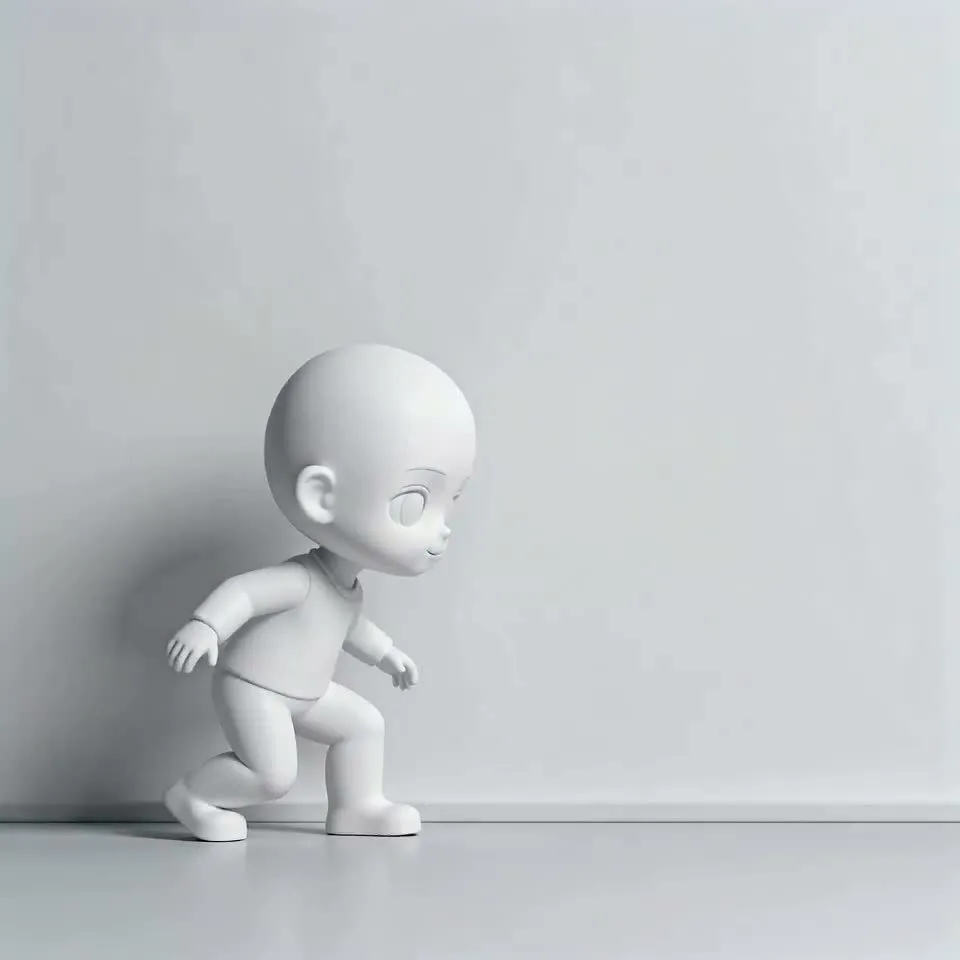
Watch the reference at normal speed before extracting stills. A frame shows body position, but the video supplies how that position changes. Check the order of foot contacts, the lean of the torso, and the direction of travel. Those are useful motion cues to preserve when the final character has a different silhouette.
Use your own rig and motion, or a licensed clip. Avoid using a recognizable person’s performance or someone else’s protected character as the shortcut to a new production. The reference should give you a movement structure you are entitled to reuse.
When changing a stylized humanoid into an animal character, compare the step and torso lean throughout. Different body proportions can change how the movement reads.
2. Export the animation without editor overlays
Use a detailed white model when you need to carry over an articulated action. Its visible limbs and completed movement give the renderer more motion detail than coarse blocking with geometric placeholders.
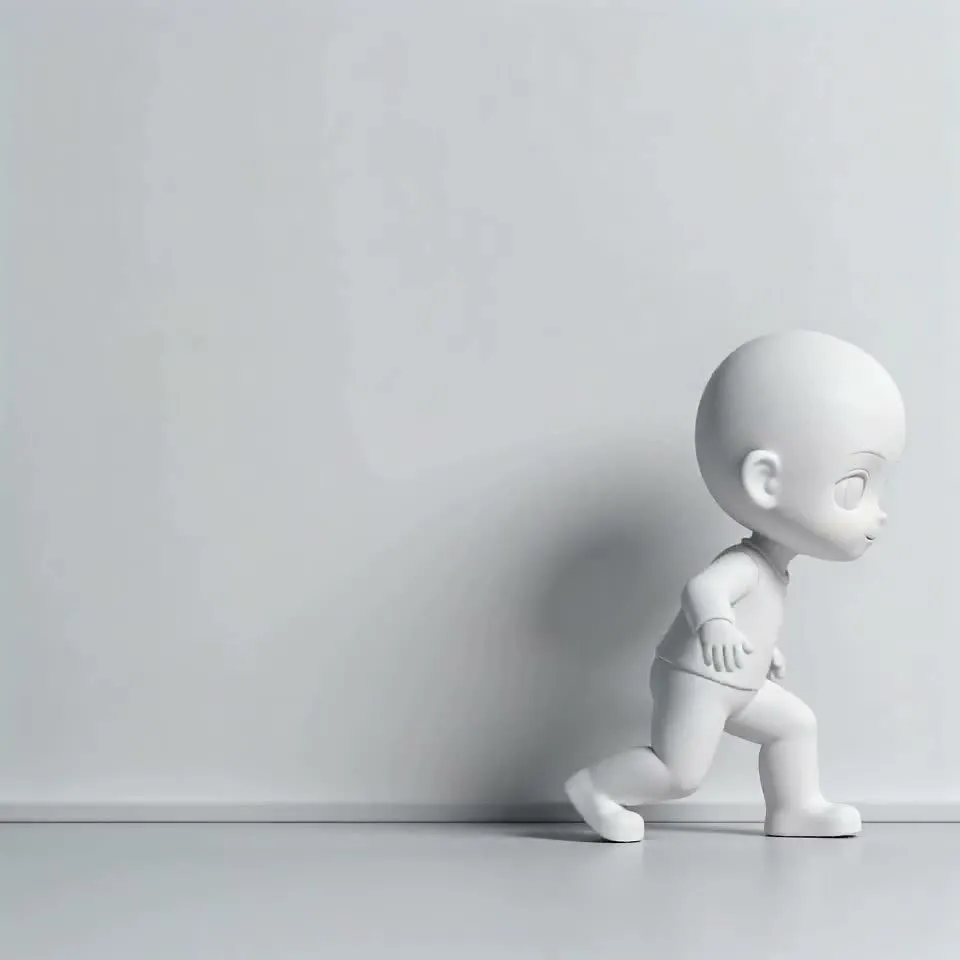
Hide trajectory lines, coordinate axes, and camera cones before you export. Anything left in the frame can show up in the render. Export the clean camera view and inspect that file before uploading it.
Check the entire clip, including the last frame. An editor label that appears only at the end still becomes part of the reference. Remove overlays at export. Keep the floor or other surfaces that help explain the action, while removing controls that belong to the editor.
Keep one subject and one continuous action for the six-second shot. That makes the comparison manageable. Add scene changes only when your reference describes them.
3. Specify what the new scene should contain
Describe the replacement setting: a futuristic city at night, dense skyscrapers, large holographic panels, neon light, and small flying vehicles. Place a little raccoon in black clothing on a roof. Keep its silhouette readable as it takes careful steps.
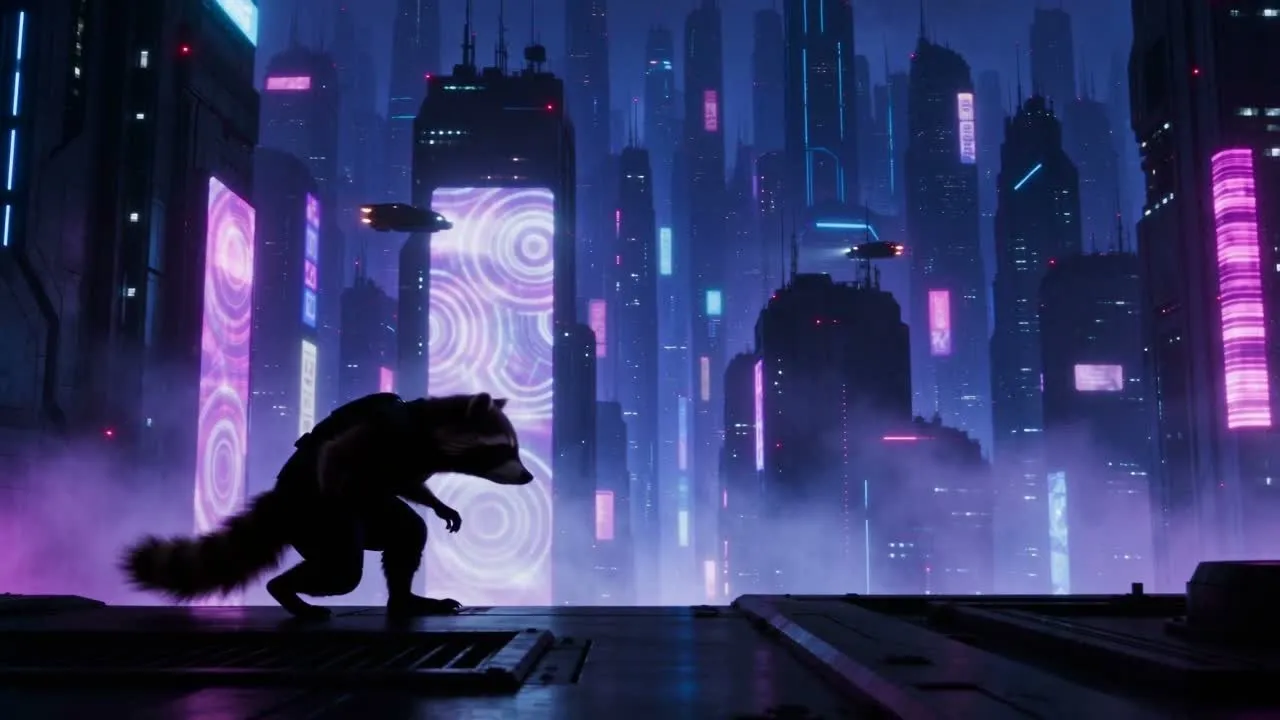
Write the new scene with the same level of specificity. Name where the character is standing and where the background sits. A rooftop foreground and distant towers give different depth cues from a street full of buildings.
For a different character, describe the visible features of a design you own. The request below uses only text and one video, with no separate appearance image.
You can add a permitted image as reference_image when your own production needs one. Seedance 2.5 allows up to 30 images alongside up to 10 videos and 10 audio items. Explain what each added asset controls in the text. Do not assign an image the role reference_video; the role must match its content type.
4. Write the brief
Write the setting, character, and sound instructions in one brief. Keep camera movement and action tied to the reference video so the text does not compete with it.
Render the white-model video, video 1. Use no background music;
generate only environmental sounds and action sounds.

Rendering requirements: The background is a cyberpunk city at night
in deep blue and purple tones, with densely packed skyscrapers,
large holographic billboards and neon lights between the buildings.
Several flying vehicles move through the air, showing faint lights
and making faint mechanical sounds.

The character is a small raccoon wearing black night clothes,
seen as a silhouette and taking careful steps. The character moves
on the roof of one of the city's skyscrapers.
The no-music instruction belongs in the prompt. generate_audio: true requests an audio track; it does not select a music genre or expose a separate effects-only switch. Review the generated soundtrack to decide whether it follows the brief.
Use six seconds to match the clip length and 720p to match its 1280 × 720 dimensions. The clip’s exact request, seed, and resolution setting are unavailable; these are the settings to send in your VizoAPI request.
5. Submit a reference-video request
Replace the placeholder URL with the clean animation file. Send this body to POST /v1/generations:
{
  "model": "seedance-2-5",
  "input": {
    "content": [
      {
        "type": "text",
        "text": "Render the white-model video, video 1. Use no background music; generate only environmental sounds and action sounds. The background is a cyberpunk city at night in deep blue and purple tones, with densely packed skyscrapers, large holographic billboards and neon lights between the buildings. Several flying vehicles move through the air, showing faint lights and making faint mechanical sounds. The character is a small raccoon wearing black night clothes, seen as a silhouette and taking careful steps. The character moves on the roof of one of the city's skyscrapers."
      },
      {
        "type": "video_url",
        "video_url": {"url": "https://example.com/white-model-walk.mp4"},
        "role": "reference_video"
      }
    ],
    "omni_reference_task_type": "reference",
    "duration": 6,
    "ratio": "16:9",
    "resolution": "720p",
    "generate_audio": true
  }
}
Keep model outside input. The content array contains the text and media. The video requires the reference_video role and an omni_reference_task_type; this example uses reference to create a new shot from the input.
Seedance 2.5 accepts integer durations from 4 to 30 seconds, plus -1 for automatic duration. The accepted resolutions are 480p, 720p, and 1080p. This request explicitly asks for six seconds at 720p in 16:9.
The input is square and the render is landscape, so their framing differs. Check the new space around the subject when you change aspect ratio. If your delivery needs the original framing, choose the output ratio with that requirement in mind and review the result.
Do not attach a dedicated first_frame or last_frame alongside the video. Those roles cannot be combined with reference images, videos, or audio in the same request. A still used to guide appearance belongs in reference_image.
6. Compare movement before judging surface detail
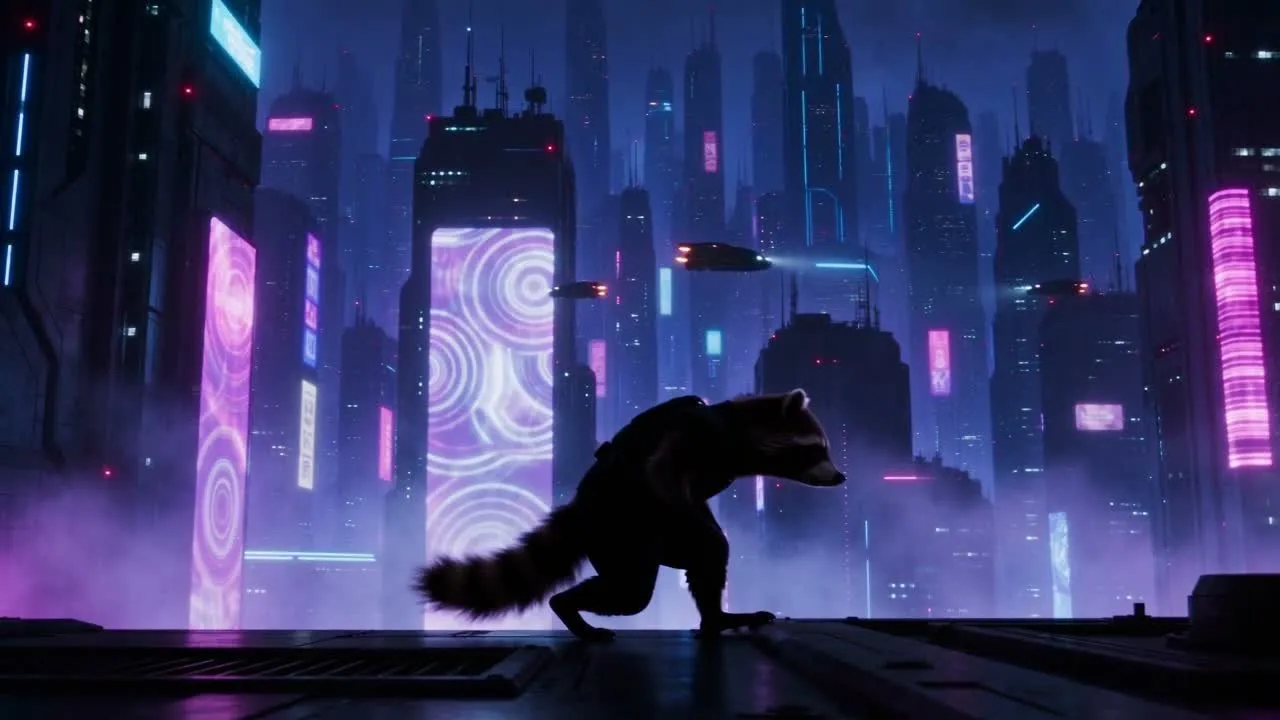
Inspect the torso lean first. Then follow the feet through the step. Check whether the character remains in contact with the roof and whether its limbs continue moving through the whole clip. A strong silhouette makes those checks easier than judging small costume details in a dark scene.
The rendered character has a tail and different proportions from the white figure. Review those added parts separately. They need to move plausibly without obscuring the original action. Accept the result only if the action still reads at playback speed.
Next, inspect the setting. The foreground should remain a roof the character can walk on. Distant towers and flying vehicles should stay behind the performance. A bright panel crossing the subject can make a correct step hard to read.
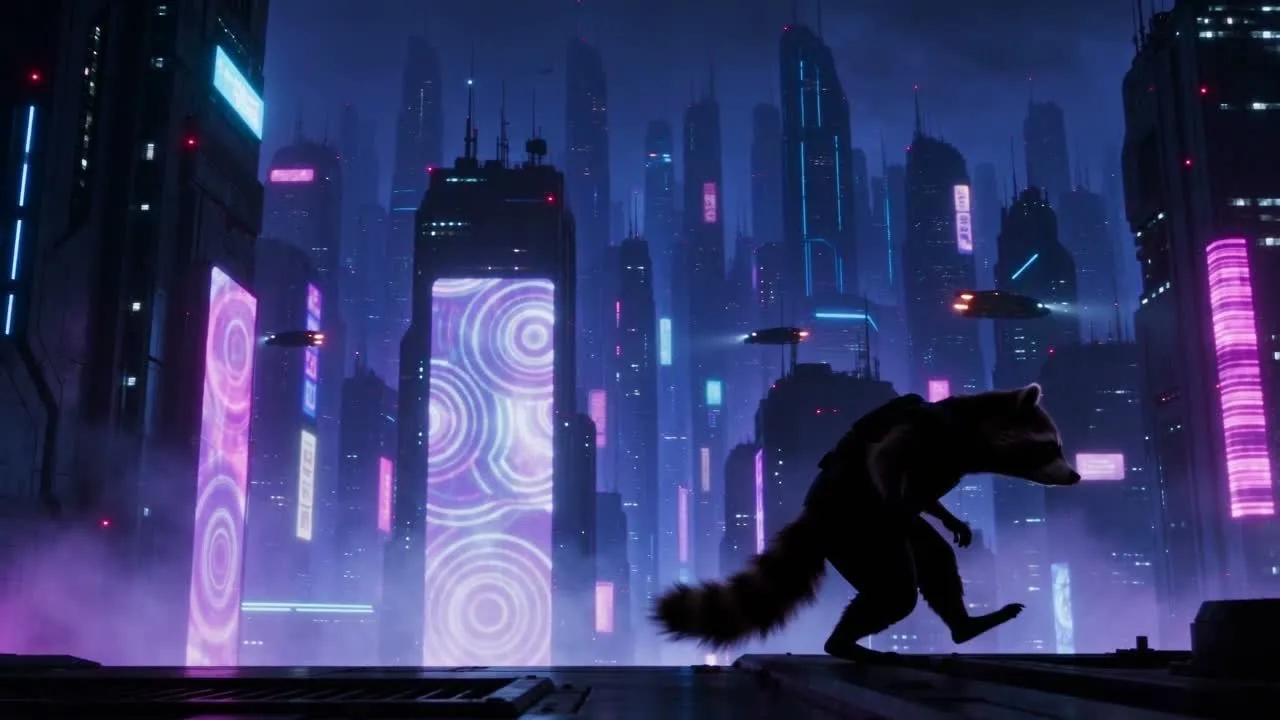
If the output retains editor geometry, clean your animation export. If the action is incomplete, repair the animation. If the new setting is wrong, revise the scene description. Those are different changes; identify the visible failure before submitting another generation.
Listen to the six-second clip separately. It has no detected spoken dialogue. Check your own result for environmental and action sounds without background music before accepting its audio.
For a later local reshoot, VizoAPI also exposes the edit task type. That is a separate request shape: use duration: -1 and ratio: "adaptive". The request above remains a reference-based re-render. Save its input clip and brief alongside the accepted output so a future revision starts from the same motion.